Your first service
A service is one system Prodpeek can reach, bound to one read-only policy. This walks through Coolify; every other service follows the same shape, and the per-service credential steps are in Connect a service.
1. Get the credential
Each service has its own page with the exact clicks and — more importantly — what to switch off. For Coolify:
Do that first. Come back with the token.
2. Add the service
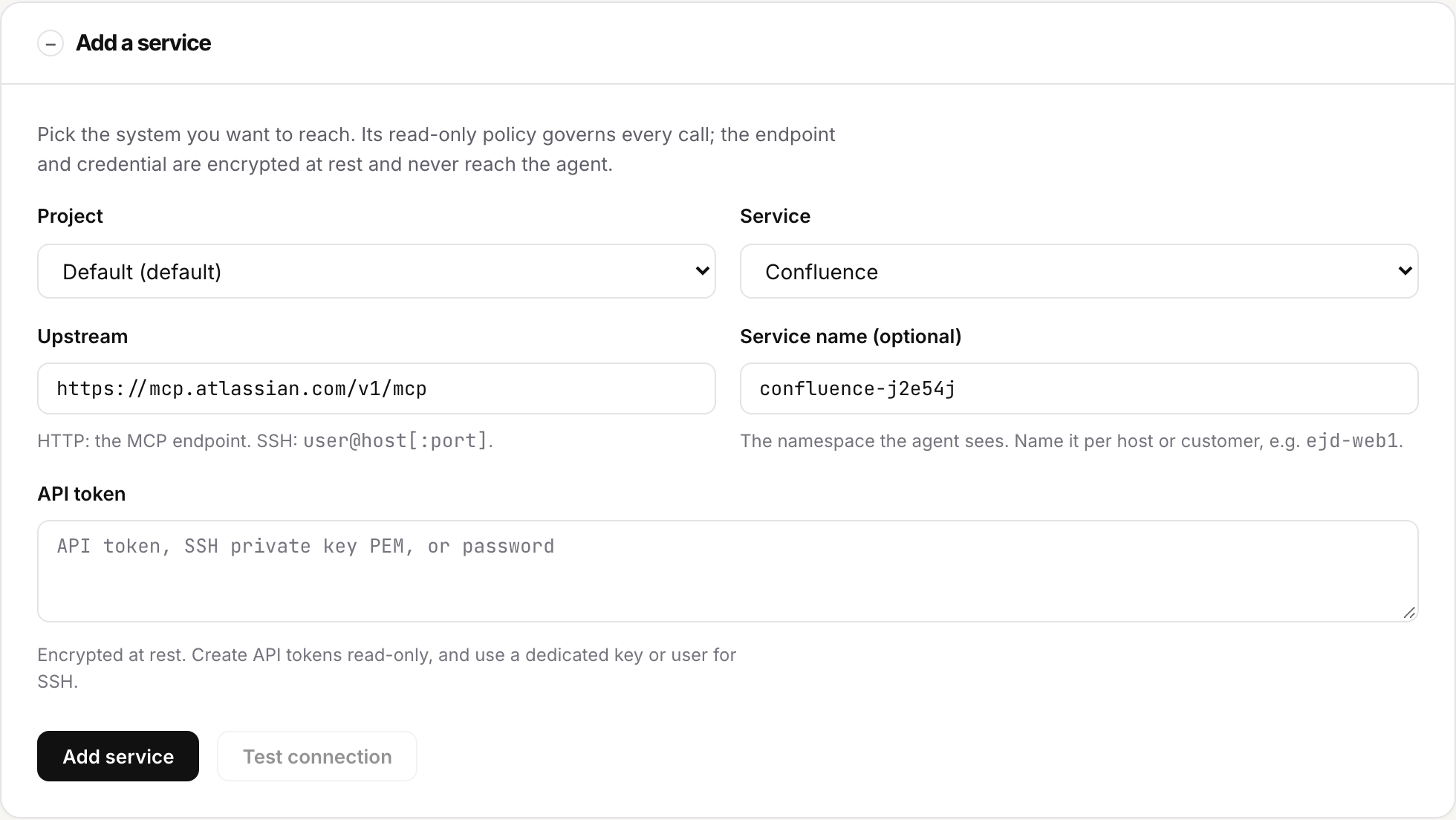
In the console, Services → Add a service.
| Field | What it means |
|---|---|
| Project | Which customer or environment this belongs to. Keys are scoped to one project and cannot reach another. |
| Service | The policy that will govern it, e.g. coolify/read-only. This decides what is allowed. |
| Upstream | Where the system lives, e.g. https://coolify.ejd.dk/mcp. |
| Service name | The namespace agents see (ejd-coolify__list_applications). Name it per host or customer. |
| Credential | Pasted here, encrypted immediately, never shown again. |
| Extra request headers | Optional, disclosed. For upstreams that need more than a token — see below. |
Name it after the thing, not the vendor
ejd-coolify rather than coolify. When you have three customers on Coolify,
the agent's tool names are the only thing telling them apart.
3. Test the connection
Press Test connection. Prodpeek connects with the credential you just stored, asks the upstream what tools it has, and classifies every one against the policy:
- Allowed — the policy permits it and the agent can call it.
- Refused by the policy — the vendor offers it; Prodpeek will not pass it on.
- Advertised but absent from the policy — the vendor has a tool nobody has classified. Denied by default. This is deny-by-default visible: a tool nobody has judged is refused until somebody does.
That third list is the useful one. If it is long, the profile was drafted against a different version of the vendor's server — tell us and it gets corrected rather than quietly allowed.
The drop link
Everything above assumes you have the credential in front of you. When an agent sets a service up, it must not.
The agent calls add_service without a credential. It gets back a one-time
URL:
{
  "name": "ejd-coolify",
  "state": "awaiting_credential",
  "credential_drop": {
    "path": "/drop/3MF5uUq0O_TQbSgXI-1f5VOIemeJEyaMYkoBu70eGHM",
    "expires_at": "2026-09-24T15:09:34+00:00"
  }
}
It hands you that URL. You open it, paste the secret, and the link dies.
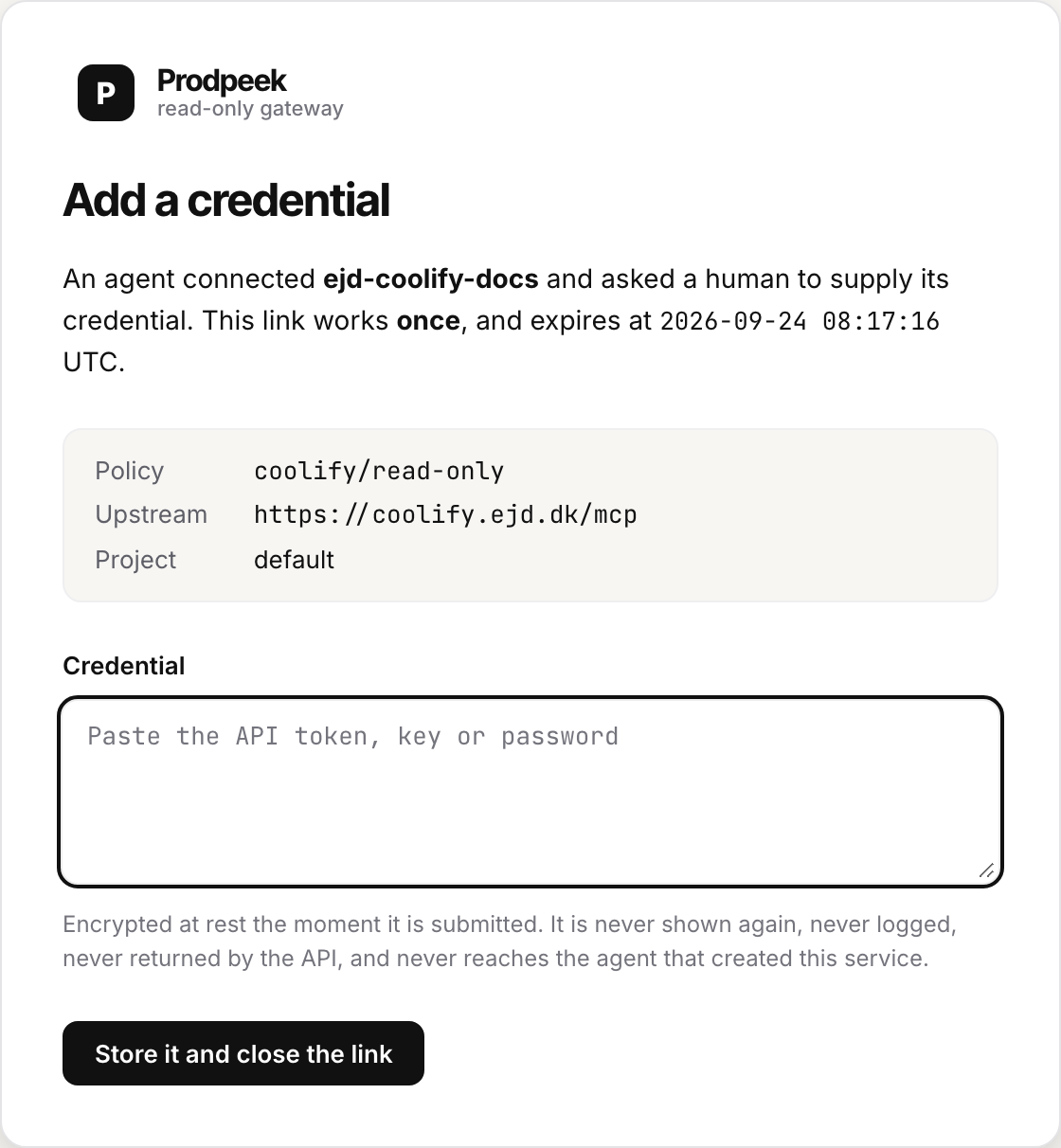
The agent is told the service is active and never learns what made it active. No login is needed to open the link — the person who fixes a service at 02:00 is not necessarily the person with a console account, and requiring one pushes everybody back to pasting secrets into chat.
One use, fifteen minutes. A second attempt finds nothing to spend.
Never paste a credential into a chat with an agent
Once it is in a transcript it is in a log, a vector store, and whatever your
provider retains. The drop link exists so this is never necessary. If an agent
asks you for a credential directly, it is doing it wrong — point it at
add_service with no credential.
Extra request headers
Most upstreams need only a token. A few need one more — to say which of your things a call is for when one address serves several, or to get through whatever sits in front of the upstream.
Two shapes you will actually meet:
The first is a multi-tenant MCP server that routes by header. The second is an upstream behind Cloudflare Access, which wants its own pair of headers before the request ever reaches the server.
Expand Extra request headers on the add-service form and enter one per line as
Name: value. From the API, pass a headers object.
Three things about them:
- They are encrypted at rest, like the credential, and never shown again. A field that is usually configuration and occasionally a second secret has to be treated as a secret always. The console shows you which headers a service carries, never what is in them.
Authorizationis refused. That header belongs to the credential. So areHostand the hop-by-hop headers — those belong to the transport, and setting them by hand is how request smuggling starts.- A newline in a value is refused. That is header injection: a value that can
end its own header can add another one, and the one it would add is
Authorization.
They are routing, not security
Changing X-Grafana-URL does not turn a token for one stack into a token for
another. The token is what scopes a connection. The header just says where
to send it.
Adding a second endpoint for the same account
Some vendors split one account across several endpoints — DigitalOcean serves apps, droplets and databases separately. Expand Add another endpoint for this account on a saved service: the credential is copied inside the store, you never re-enter it, and it is never shown.